Introduction
Part of The EUC Guide to the Digital Workspace
Hybrid work is no longer a project. It is a given. The conversation inside IT organizations has moved on: not whether desktops and applications are delivered from the cloud, but how to do that in the most secure, cost-effective way, and what role artificial intelligence plays in it.
Three developments currently define the End User Computing playing field:
- AI is the new layer above, and sometimes inside, the workplace. AI agents already live in operating systems, office suites, management tools, and increasingly directly in hardware, through local processing units (NPUs) built specifically to accelerate AI models, regardless of which AI vendor or underlying model sits behind them. This changes both the compute requirements at the workplace (the rise of the “AI PC”) and the way administrators design and monitor their environments.
- Zero Trust has replaced perimeter security. The corporate network as a trusted zone no longer exists. Identity, device state, and context determine, per session, whether access is granted, regardless of whether a user is in the office, at home, or on the move.
- Consumption and cost models have become an architecture decision. With the rise of pay-as-you-go cloud services, cost control (FinOps) is no longer an afterthought but a design criterion: how an environment is built directly determines what it costs to run.
Two further themes played almost no role until recently but are now a fixed part of every workplace strategy: digital sovereignty (where data lives, under which jurisdiction, and what that means for European organizations) and sustainability (the energy footprint of increasingly powerful endpoints and AI workloads).
Sustainability plays out not only at the level of energy consumption, but also in the choice of access device itself. Software-defined thin clients, for example, can give aging PCs and laptops a second life instead of writing them off, substantially extending hardware lifespan and reducing e-waste. That topic, thin clients, zero clients, and repurposed hardware as the gateway to any form of cloud workplace regardless of the desktop model behind it, gets its own chapter later in this book.
From mainframe to cloud: a short history of the workplace
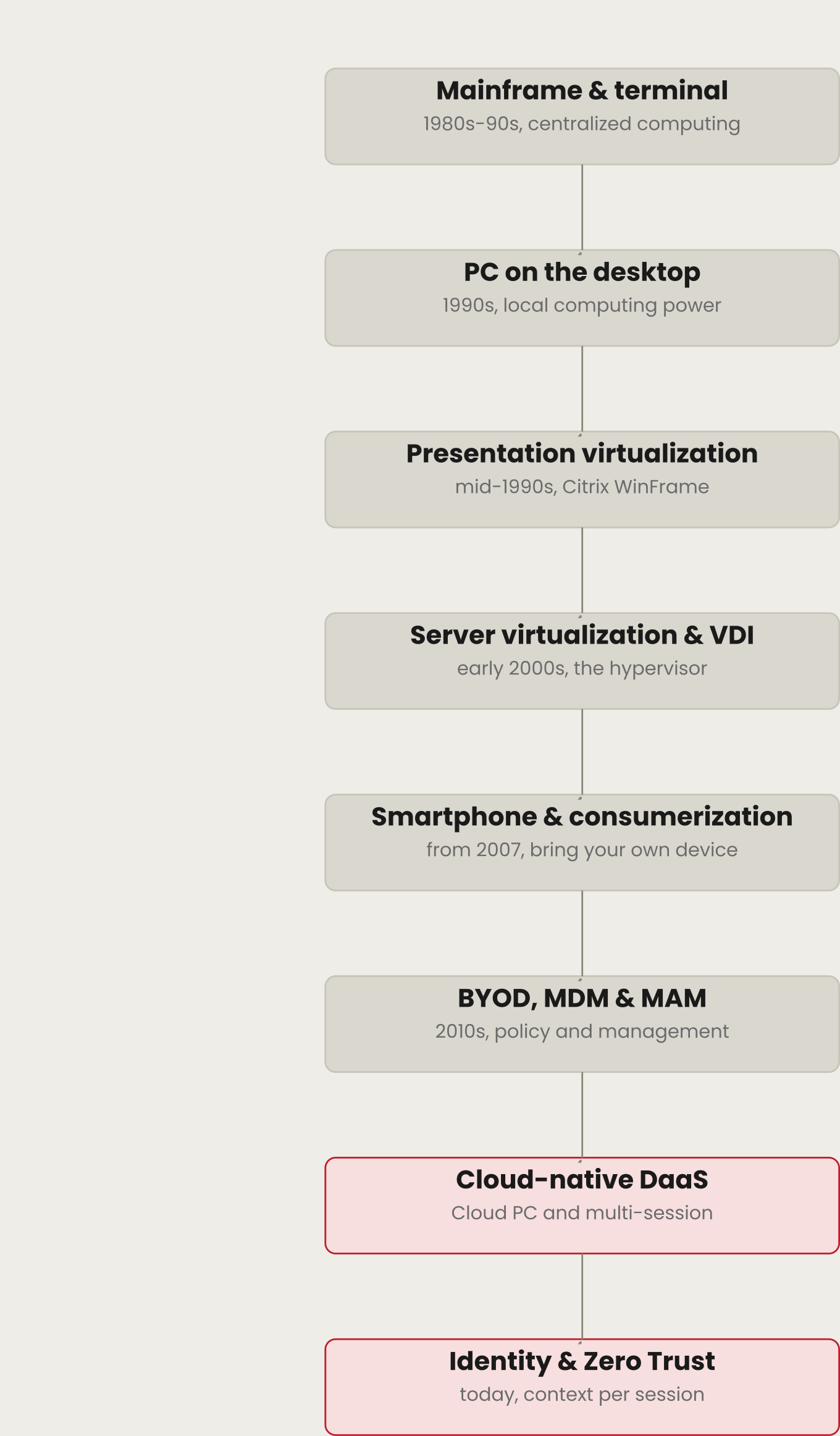
To understand where we stand today, it helps to look back at how the workplace evolved.
In the 1980s and 90s, the workplace was typically a “dumb” screen and keyboard attached to a mainframe or minicomputer. All compute power sat centrally; the user had almost no local intelligence at their disposal.
With the rise of the PC, that compute power moved to the user’s desk. The operating system and applications ran locally. That gave a lot of freedom, but made management at scale difficult: every PC was effectively a unique, manually maintained machine.
From the mid-1990s, a first major centralizing wave emerged: presentation virtualization. Citrix WinFrame, and later Microsoft Terminal Server and its successors, brought compute power back to the datacenter. A single Windows session on a server was shared by dozens of users at once, who only sent and received the screen image and input through a remoting protocol.
In the early 2000s, server virtualization made it possible to run multiple operating systems on a single physical server through a hypervisor. That success on the server side spilled over to the desktop a few years later: Virtual Desktop Infrastructure (VDI) gave every user their own, fully isolated virtual PC in the datacenter, instead of a shared session.
The arrival of the smartphone changed the playing field again, and fundamentally so. Employees brought personal phones into the office and wanted to reach business email, calendars, and documents from them, often ahead of what the IT department had planned or approved. This phenomenon became known as Consumerization of IT: the IT department no longer alone decided which device and which software an employee used; the employee increasingly did that themselves.
That development was quickly formalized into Bring Your Own Device (BYOD): organizations made deliberate policy about which personal devices could access corporate data, initially supported by Mobile Device Management (MDM) and later by more granular Mobile Application Management (MAM), which managed only the business app and its data rather than the whole device.
Over the following decade, the physical server gradually disappeared from the equation. Desktop as a Service gave way to fully cloud-native variants: Cloud PCs and cloud-hosted multi-session Windows environments run by a hyperscaler. No own datacenter and no own hypervisor management required; billing happens per user or per consumption.
Today, what matters is no longer the device or the physical location, but the identity of the user and the context in which they work: the core of the Zero Trust thinking this book works from, and the starting point for every chapter that follows.
Away from tool sprawl
In the early days of centralization, a familiar problem quickly emerged: departments each choosing their own desktop model, with no coordination between them. That problem never went away, it simply took a more modern shape: tool sprawl, or platform sprawl. Organizations today typically manage a combination of unified endpoint management, multiple DaaS platforms, separate identity tools, distinct security consoles, and sometimes even shadow IT in the form of unapproved AI tools (“shadow AI”) where employees copy corporate data without IT ever seeing it.
A well-integrated, heterogeneous workplace world still delivers the most value. What has changed is that this integration is now more often achieved through APIs, unified endpoint management, and AI-driven management platforms than through a single vendor building everything itself.
Toward a holistic vision
The art remains unchanged: do not be seduced by a single technology, but look for a total solution that usually consists of a mix of models: a physical laptop for one user group, a Cloud PC for another, a multi-session environment for a third. What is new is that AI agents inside management tooling increasingly help determine that mix themselves: based on usage data, a platform can now advise which model fits which user, and let autoscaling and rightsizing run largely on their own.
Closer to the business
In the past, the end of support for an operating system was often the signal to revisit a workplace strategy. Today that moment has become structural: cloud platforms constantly ship new releases, and the business expects IT to keep pace continuously rather than execute one large migration every seven years. IT organizations that get this right stand closer to the business: they can offer new employees a working setup faster, scale with seasonal peaks, and produce auditable cost reports that map directly onto how the business itself steers on OPEX rather than CAPEX.
How this book rates technology
Every desktop model and every technology in this book is rated at the end of its chapter against the themes below. Scores are shown as a bar with the number alongside it (for example, 4/5), so the rating can be read at a glance and compared precisely across models and chapters. Where a criterion genuinely does not apply to a model (for example, mobility for a fully fixed workplace), it is marked N/A rather than given a low score, so “not built for this” is never confused with “performs poorly here.”
| Category | Criterion | What it measures |
|---|---|---|
| Business | Flexibility | Cloud elasticity, speed of scaling up and down |
| Business | Cost savings / FinOps | TCO, and how transparent and steerable spend is |
| Business | Application support | Legacy and modern (SaaS/web-based) applications |
| Business | Portability & vendor lock-in | How easily images, identities, profiles and data move between platforms |
| Business | Proven maturity & ecosystem | Production references at scale, partner/ISV depth, roadmap predictability |
| Business | Compliance & regulation | Demonstrable adherence to GDPR, NIS2, DORA and similar rules |
| Business | Digital sovereignty & data residency | Where data sits, under which jurisdiction, and how much control the organization retains |
| User | Multimedia & graphics | Video, Unified Communications (Teams/Zoom), graphics-intensive work |
| User | BYOD & identity-centric access | Personal devices, access based on identity rather than device |
| User | Mobility | Anywhere, anytime, online and offline |
| User | Autonomy | How self-sufficient the user can be |
| IT | Security & Zero Trust | No implicit trust, context-driven access |
| IT | Manageability | Degree of automation, use of AI agents for management |
| IT | AI readiness | NPU/GPU capacity, shared or exclusive use, AI orchestration, AI governance |
| IT | Stability | Redundancy and cloud SLAs |
| IT | Complexity | Number of stacked technologies and consoles |
How this book came together
This book was built chapter by chapter. For each chapter, the current state of the market, including recent product announcements, name changes, and end-of-support dates, was researched before the text was written. Where a technology or vendor recently changed names, such as Windows 365 Frontline becoming Windows 365 Flex, or VMware End-User Computing continuing on as Omnissa, that is called out explicitly rather than quietly keeping the old name. Where a technology is visibly on its way out, such as App-V or certain Ivanti products, that is not softened either.
The sixteen scoring criteria above were not fixed in one sitting either. While the first chapters were being written, they were repeatedly sharpened: criteria were renamed, moved between the three categories, and added once it became clear a relevant aspect, such as AI readiness or digital sovereignty, was still missing. That iterative approach was deliberately maintained throughout the book, even when it meant an earlier chapter had to be updated afterward to stay consistent with a later insight.
This book therefore describes the state of the market at the time of writing, not a timeless truth. Some of the technology covered here, such as Computer-Using Agents and AVD Hybrid, was only weeks old at the time of writing. Like the digital workplace it describes, this book is not an endpoint, but a snapshot that will need periodic revision.
Where to go next
- Foreword
- Introduction
- Protected: The Physical Workplace: PC/Laptop and Cloud PC
- Protected: Endpoints: Thin Clients, Zero Clients & Repurposed Hardware
- Protected: Multi-Session Desktops: Azure Virtual Desktop Multi-Session & Windows 365 (Shared)
- Protected: Virtual Desktop Infrastructure Today: AVD Personal, Citrix DaaS & Omnissa Horizon
- Protected: Pooled vs. Personal Desktops: Image Management, Autoscaling & Golden Images
- Protected: Application Delivery Today: MSIX App Attach & Cloud-Native App Delivery
- Protected: User Environment & Profile Management: FSLogix, Cloud Cache & UEM
- Protected: Cloud Computing & xaaS Today
- Protected: Consumerization, Mobility & Zero Trust
- Protected: Roadmap & Strategy
- Protected: Conclusion